![[banner]](images/banner.png "Batsto Lake, Wharton State Forest, New Jersey")
Examples in Summary and Analysis of Extension Program Evaluation
SAEPER: Two-way
ANOVA
SAEPER: Using Random Effects
in Models
SAEPER: What are Least
Square Means?
Packages used in this chapter
The following commands will install these packages if they are not already installed:
if(!require(FSA)){install.packages("FSA")}
if(!require(ggplot2)){install.packages("ggplot2")}
if(!require(car)){install.packages("car")}
if(!require(multcomp)){install.packages("multcomp")}
if(!require(emmeans)){install.packages("emmeans")}
if(!require(nlme)){install.packages("nlme")}
if(!require(lme4)){install.packages("lme4")}
if(!require(lmerTest)){install.packages("lmerTest")}
if(!require(rcompanion)){install.packages("rcompanion")}
When to use it
Null hypotheses
How the test works
Assumptions
See the Handbook for information on these topics.
Examples
The rattlesnake example is shown at the end of the “How to do the test” section.
How to do the test
For notes on linear models and conducting anova, see the “How to do the test” section in the One-way anova chapter of this book. For two-way anova with robust regression, see the chapter on Two-way Anova with Robust Estimation.
Two-way anova example
### --------------------------------------------------------------
### Two-way anova, SAS example, pp. 179–180
### --------------------------------------------------------------
Input = ("
id Sex Genotype Activity
1 male ff 1.884
2 male ff 2.283
3 male fs 2.396
4 female ff 2.838
5 male fs 2.956
6 female ff 4.216
7 female ss 3.620
8 female ff 2.889
9 female fs 3.550
10 male fs 3.105
11 female fs 4.556
12 female fs 3.087
13 male ff 4.939
14 male ff 3.486
15 female ss 3.079
16 male fs 2.649
17 female fs 1.943
19 female ff 4.198
20 female ff 2.473
22 female ff 2.033
24 female fs 2.200
25 female fs 2.157
26 male ss 2.801
28 male ss 3.421
29 female ff 1.811
30 female fs 4.281
32 female fs 4.772
34 female ss 3.586
36 female ff 3.944
38 female ss 2.669
39 female ss 3.050
41 male ss 4.275
43 female ss 2.963
46 female ss 3.236
48 female ss 3.673
49 male ss 3.110
")
Data = read.table(textConnection(Input),header=TRUE)
Means and summary statistics by group
library(FSA)
Sum = Summarize(Activity ~ Sex + Genotype,
data = Data)
Sum
Sex Genotype n mean sd min Q1 median Q3 max
1 female ff 8 3.05025 0.9599032 1.811 2.363 2.864 4.008 4.216
2 male ff 4 3.14800 1.3745115 1.884 2.183 2.884 3.849 4.939
3 female fs 8 3.31825 1.1445388 1.943 2.189 3.318 4.350 4.772
4 male fs 4 2.77650 0.3168433 2.396 2.586 2.802 2.993 3.105
5 female ss 8 3.23450 0.3617754 2.669 3.028 3.158 3.594 3.673
6 male ss 4 3.40175 0.6348109 2.801 3.033 3.266 3.634 4.275
### Add standard error
Sum$se = Sum$sd/sqrt(Sum$n)
Sum
Sex Genotype n mean
sd min Q1 median Q3 max se
1 female ff 8 3.05025 0.9599032 1.811 2.363 2.864 4.008 4.216 0.3393770
2 male ff 4 3.14800 1.3745115 1.884 2.183 2.884 3.849 4.939 0.6872558
3 female fs 8 3.31825 1.1445388 1.943 2.189 3.318 4.350 4.772 0.4046556
4 male fs 4 2.77650 0.3168433 2.396 2.586 2.802 2.993 3.105 0.1584216
5 female ss 8 3.23450 0.3617754 2.669 3.028 3.158 3.594 3.673 0.1279069
6 male ss 4 3.40175 0.6348109 2.801 3.033 3.266 3.634 4.275 0.3174054
Interaction plot using summary statistics
library(ggplot2)
pd = position_dodge(.2)
ggplot(Sum, aes(x=Genotype,
y=mean,
color=Sex)) +
geom_errorbar(aes(ymin=mean-se,
ymax=mean+se),
width=.2, linewidth=0.7, position=pd) +
geom_point(shape=15, size=4, position=pd) +
theme_bw() +
theme(axis.title.y = element_text(vjust= 1.8),
axis.title.x = element_text(vjust= -0.5),
axis.title = element_text(face = "bold")) +
scale_color_manual(values = c("black",
"blue"))+
ylab("Activity")

Interaction plot for a two-way anova. Square points
represent means for groups, and error bars indicate standard errors of the mean.
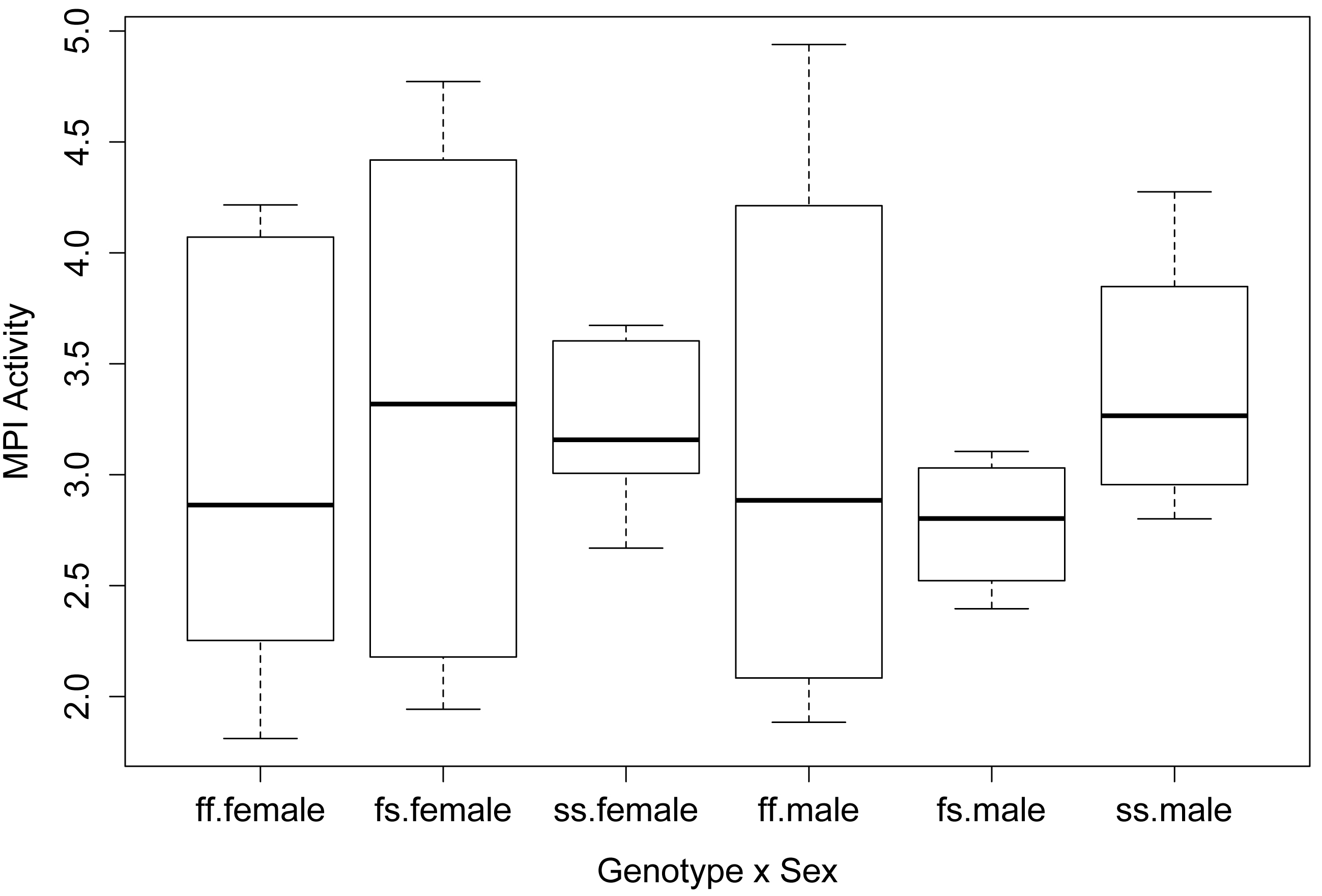
Simple box plot of main effect and interaction
boxplot(Activity ~ Genotype,
data = Data,
xlab = "Genotype",
ylab = "MPI Activity",
col = "white")

boxplot(Activity ~ Genotype:Sex,
data = Data,
xlab = "Genotype x Sex",
ylab = "MPI Activity",
col = "white")
Fit the linear model and conduct ANOVA
model = lm(Activity ~ Sex + Genotype + Sex:Genotype,
data=Data)
library(car)
Anova(model,
type="II") ### Type II sum of squares
### If you use type="III", you need the
following line before the analysis
### options(contrasts = c("contr.sum",
"contr.poly"))
Sum Sq Df F value Pr(>F)
Sex 0.0681 1 0.0861 0.7712
Genotype 0.2772 2 0.1754 0.8400
Sex:Genotype 0.8146 2 0.5153 0.6025
Residuals 23.7138 30
anova(model) # Produces type I sum of squares
Df Sum Sq Mean Sq F value Pr(>F)
Sex 1 0.0681 0.06808 0.0861 0.7712
Genotype 2 0.2772 0.13862 0.1754 0.8400
Sex:Genotype 2 0.8146 0.40732 0.5153 0.6025
Residuals 30 23.7138 0.79046
summary(model) # Produces r-square, overall p-value, parameter estimates
Multiple R-squared: 0.04663, Adjusted R-squared: -0.1123
F-statistic: 0.2935 on 5 and 30 DF, p-value: 0.9128
Checking assumptions of the model
hist(residuals(model),
col="darkgray")
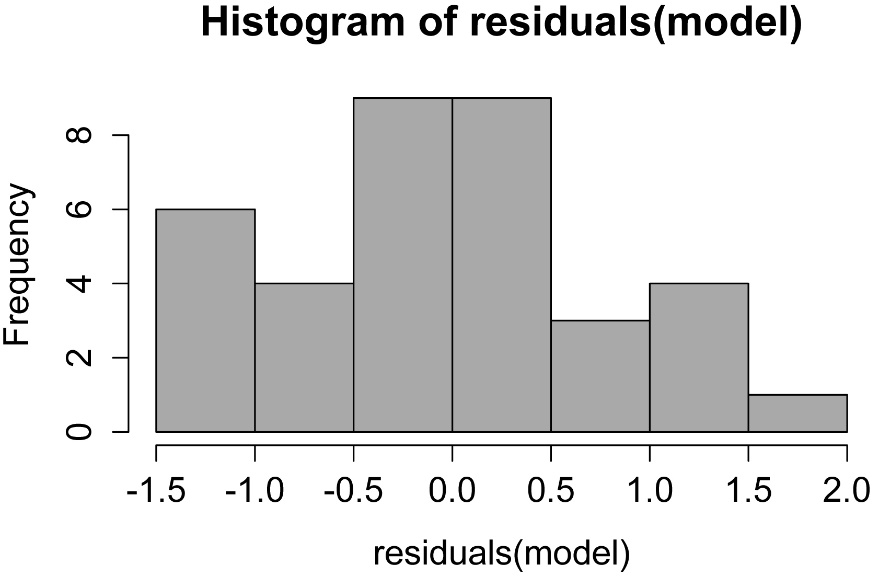
A histogram of residuals from a linear model. The
distribution of these residuals should be approximately normal.
plot(fitted(model),
residuals(model))

A plot of residuals vs. predicted values. The residuals should be unbiased and homoscedastic. For an illustration of these properties, see the Introduction to Parametric Tests in SAEPER (rcompanion.org/handbook/I_01.html).
Additional model checking plots
plot(model)
Post-hoc comparison of least-square means
For notes on least-square means, see the “Post-hoc comparison
of least-square means” section in the Nested anova chapter in this book.
One advantage of the using the emmeans package for post-hoc tests is that
it can produce comparisons for interaction effects.
In general, if the interaction effect is significant, you will want to look at comparisons
of means for the interactions. If the interaction effect is not significant but
a main effect is, it is appropriate to look at comparisons among the means for that
main effect. In this case, because no effect of Sex, Genotype, or
Sex:Genotype was significant, we would not actually perform any mean separation
test.
Mean separations for main factor with emmeans
library(emmeans)
marginal = emmeans(model, ~ Genotype)
pairs(marginal, adjust="tukey")
contrast estimate SE df t.ratio p.value
ff - fs 0.0517 0.385 30 0.134 0.9901
ff - ss -0.2190 0.385 30 -0.569 0.8376
fs - ss -0.2707 0.385 30 -0.703 0.7634
Results are averaged over the levels of: Sex
P value adjustment: tukey method for comparing a family of 3 estimates
library(multcomp)
cld(marginal, Letters=letters, adjust="tukey")
Genotype emmean SE df lower.CL upper.CL .group
fs 3.05 0.272 30 2.36 3.74 a
ff 3.10 0.272 30 2.41 3.79 a
ss 3.32 0.272 30 2.63 4.01 a
Results are averaged over the levels of: Sex
Confidence level used: 0.95
Conf-level adjustment: sidak method for 3 estimates
P value adjustment: tukey method for comparing a family of 3 estimates
significance level used: alpha = 0.05
### Means sharing a letter in .group are not
significantly different
Mean separations for interaction effect with emmeans
library(emmeans)
marginal = emmeans(model, ~ Sex:Genotype)
pairs(marginal, adjust="tukey")
### Results not shown
library(multcomp)
cld(marginal, Letters=letters, adjust="tukey")
Sex Genotype emmean SE df lower.CL upper.CL .group
male fs 2.78 0.445 30 1.52 4.03 a
female ff 3.05 0.314 30 2.17 3.94 a
male ff 3.15 0.445 30 1.90 4.40 a
female ss 3.23 0.314 30 2.35 4.12 a
female fs 3.32 0.314 30 2.43 4.20 a
male ss 3.40 0.445 30 2.15 4.65 a
Confidence level used: 0.95
Conf-level adjustment: sidak method for 6 estimates
P value adjustment: tukey method for comparing a family of 6 estimates
significance level used: alpha = 0.05
### Note that means are listed from low to high,
### not in the same order as Summarize
Graphing the results
Simple bar plot with categories and no error bars
The means for the Sex x Genotype interaction can be extracted from a data frame created with the Summarize function in the FSA package, and organized into a matrix, so that they can be plotted in a simple bar plot.
library(FSA)
Sum = Summarize(Activity ~ Sex + Genotype,
data = Data)
Matriz = xtabs(mean ~ Sex + Genotype, data=Sum)
Matriz
Genotype
Sex ff fs ss
female 3.05025 3.31825 3.23450
male 3.14800 2.77650 3.40175
row.names(Matriz) = c("Female", "Male")
Matriz
Genotype
Sex ff fs ss
Female 3.05025 3.31825 3.23450
Male 3.14800 2.77650 3.40175
barplot(Matriz,
beside=TRUE,
legend=TRUE,
ylim=c(0, 5),
xlab="Genotype",
ylab="MPI Activity")

Bar plot with error bars with ggplot2
Again, a data frame is created with the Summarize function. Error bars indicate standard error of the means (se in the data frame).
library(FSA)
Sum = Summarize(Activity ~ Sex + Genotype,
data = Data)
Sum
### Add standard error
Sum$se = Sum$sd/sqrt(Sum$n)
Sum
Sex Genotype n mean
sd min Q1 median Q3 max se
1 female ff 8 3.05025 0.9599032 1.811 2.363 2.864 4.008 4.216 0.3393770
2 male ff 4 3.14800 1.3745115 1.884 2.183 2.884 3.849 4.939 0.6872558
3 female fs 8 3.31825 1.1445388 1.943 2.189 3.318 4.350 4.772 0.4046556
4 male fs 4 2.77650 0.3168433 2.396 2.586 2.802 2.993 3.105 0.1584216
5 female ss 8 3.23450 0.3617754 2.669 3.028 3.158 3.594 3.673 0.1279069
6 male ss 4 3.40175 0.6348109 2.801 3.033 3.266 3.634 4.275 0.3174054
### Plot adapted from:
### shinyapps.stat.ubc.ca/r-graph-catalog/
library(ggplot2)
ggplot(Sum,
aes(x = Genotype,
y = mean,
fill = Sex,
ymax=mean+se,
ymin=mean-se)) +
geom_bar(stat="identity", position = "dodge", width =
0.7) +
geom_bar(stat="identity", position = "dodge",
colour = "black", width = 0.7,
show.legend = FALSE) +
scale_y_continuous(breaks = seq(0, 4, 0.5),
limits = c(0, 4),
expand = c(0, 0)) +
scale_fill_manual(name = "Count type" ,
values = c('grey80', 'grey30'),
labels = c("Female",
"Male")) +
geom_errorbar(position=position_dodge(width=0.7),
width=0.0, size=0.5, color="black") +
labs(x = "\nGenotype",
y = "MPI Activity\n") +
## ggtitle("Main title") +
theme_bw() +
theme(panel.grid.major.x = element_blank(),
panel.grid.major.y = element_line(colour = "grey50"),
plot.title = element_text(size = rel(1.5),
face = "bold", vjust = 1.5),
axis.title = element_text(face = "bold"),
legend.position = "top",
legend.title = element_blank(),
legend.key.size = unit(0.4, "cm"),
legend.key = element_rect(fill = "black"),
axis.title.y = element_text(vjust= 1.8),
axis.title.x = element_text(vjust= -0.5))

Bar plot for a two-way anova. Bar heights represent means
for groups, and error bars indicate standard errors of the mean.
Rattlesnake example – two-way anova without replication, repeated measures
This example could be interpreted as two-way anova without replication or as a one-way repeated measures experiment. Below it is analyzed as a two-way fixed effects model using the lm function, and as a mixed effects model using the nlme package and lme4 package. In addition, a traditional repeated measures anova is conducted using the aov() function in the native stats package.
### --------------------------------------------------------------
### Two-way anova, rattlesnake example, pp. 177–178
### --------------------------------------------------------------
Data = read.table(header=TRUE, stringsAsFactors=TRUE, text="
Day Snake Openings
1 D1 85
1 D3 107
1 D5 61
1 D8 22
1 D11 40
1 D12 65
2 D1 58
2 D3 51
2 D5 60
2 D8 41
2 D11 45
2 D12 27
3 D1 15
3 D3 30
3 D5 68
3 D8 63
3 D11 28
3 D12 3
4 D1 57
4 D3 12
4 D5 36
4 D8 21
4 D11 10
4 D12 16
")
### Treat Day as a factor variable
Data$Day = as.factor(Data$Day)
str(Data)
'data.frame': 24 obs. of 3 variables:
$ Day : Factor w/ 4 levels "1","2","3","4": 1 1 1 1 1 1 2 2 2 2 ...
$ Snake : Factor w/ 6 levels "D1","D11","D12",..: 1 4 5 6 2 3 1 4 5 6 ...
$ Openings: int 85 107 61 22 40 65 58 51 60 41 ...
Using two-way fixed effects model
Means and summary statistics by group
library(FSA)
Sum = Summarize(Openings ~ Day,
data = Data)
Sum
Day n mean sd min Q1 median Q3 max
1 1 6 63.33333 30.45434 22 45.25 63.0 80.00 107
2 2 6 47.00000 12.21475 27 42.00 48.0 56.25 60
3 3 6 34.50000 25.95958 3 18.25 29.0 54.75 68
4 4 6 25.33333 18.08498 10 13.00 18.5 32.25 57
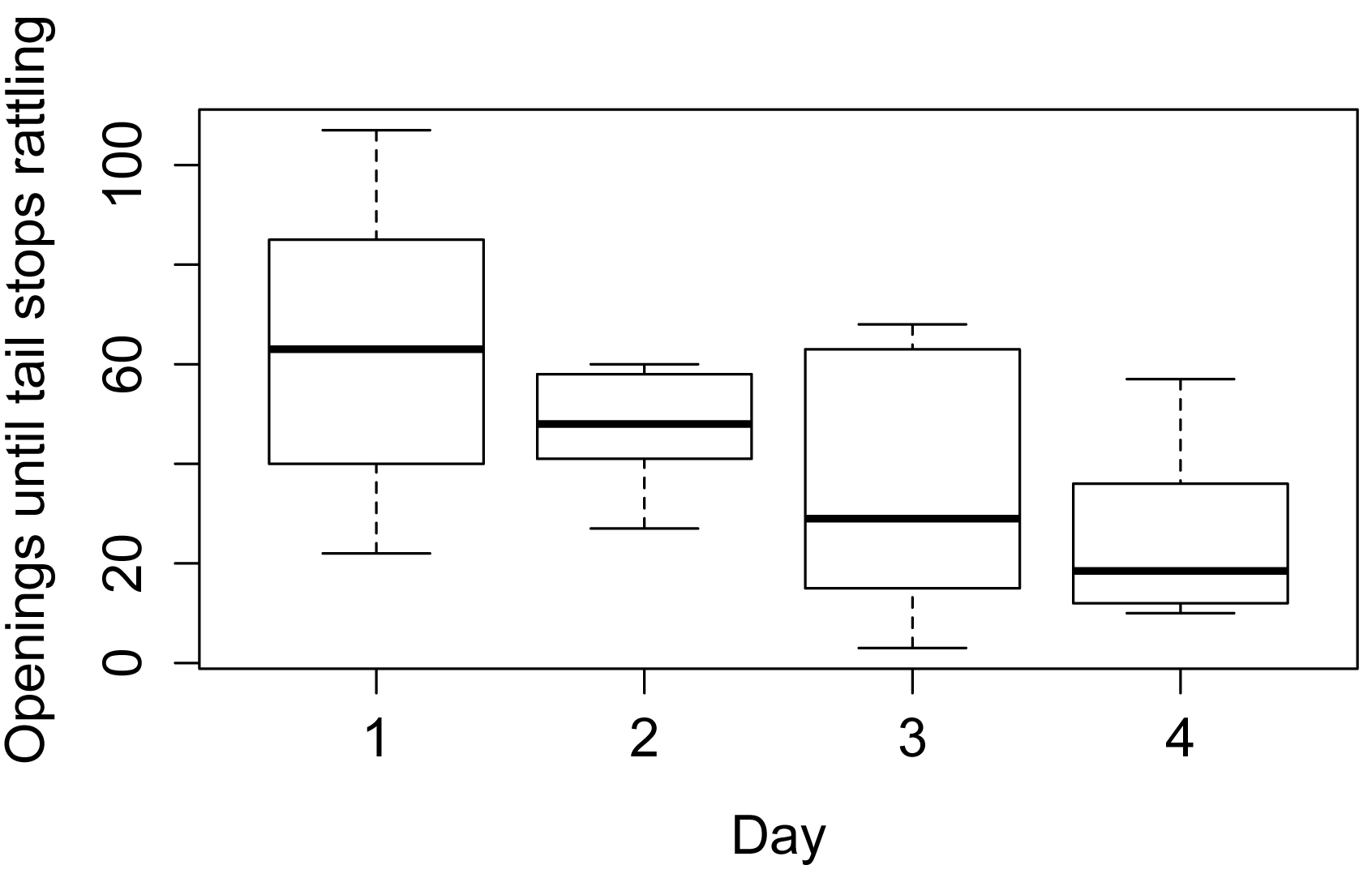
Simple box plots
boxplot(Openings ~ Day,
data = Data,
xlab = "Day",
ylab = "Openings until tail stops rattling",
col = "white")
Fit the linear model and conduct ANOVA
model = lm(Openings ~ Day + Snake,
data=Data)
library(car)
Anova(model, type="II") # Type II sum
of squares
### If you use type="III", you need the
following line before the analysis
### options(contrasts = c("contr.sum",
"contr.poly"))
Sum Sq Df F value Pr(>F)
Day 4877.8 3 3.3201 0.04866 *
Snake 3042.2 5 1.2424 0.33818
Residuals 7346.0 15
anova(model) # Produces type I sum of squares
Df Sum Sq Mean Sq F value Pr(>F)
Day 3 4877.8 1625.93 3.3201 0.04866 *
Snake 5 3042.2 608.44 1.2424 0.33818
Residuals 15 7346.0 489.73
summary(model) # Produces
r-square, overall p-value,
# parameter estimates
Multiple R-squared: 0.5188, Adjusted R-squared: 0.2622
F-statistic: 2.022 on 8 and 15 DF, p-value: 0.1142
Checking assumptions of the model
hist(residuals(model),
col="darkgray")

A histogram of residuals from a linear model. The
distribution of these residuals should be approximately normal.
plot(fitted(model),
residuals(model))
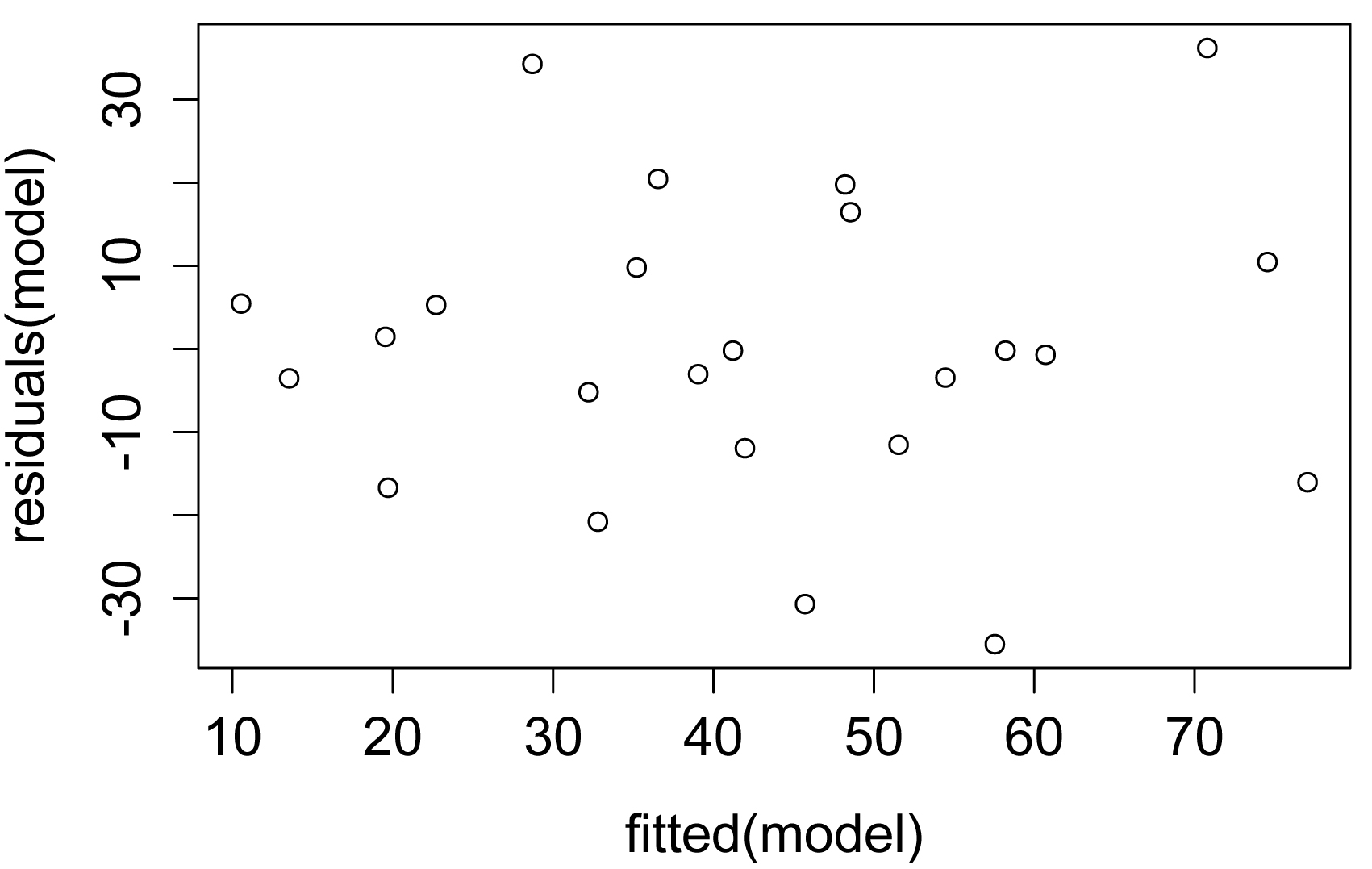
A plot of residuals vs. predicted values. The residuals
should be unbiased and homoscedastic. For an illustration of these properties,
see the Introduction to Parametric Tests in SAEPER (rcompanion.org/handbook/I_01.html).
Additional model checking plots
plot(model)
Mean separations for main factor with emmeans
library(emmeans)
marginal = emmeans(model, ~ Day)
marginal
pairs(marginal)
library(multcomp)
cld(marginal,
alpha=.05,
Letters=letters)
Day emmean SE df lower.CL upper.CL .group
4 25.3 9.03 15 6.08 44.6 a
3 34.5 9.03 15 15.24 53.8 ab
2 47.0 9.03 15 27.74 66.3 ab
1 63.3 9.03 15 44.08 82.6 b
Results are averaged over the levels of: Snake
Confidence level used: 0.95
P value adjustment: tukey method for comparing a family of 4 estimates
significance level used: alpha = 0.05
### Means sharing a letter in .group are not significantly different
Using mixed effects model with nlme
This is an abbreviated example using the lme function in the nlme package.
library(nlme)
model = lme(Openings ~ Day, random=~1|Snake,
data=Data,
method="REML")
anova.lme(model,
type="sequential",
adjustSigma = FALSE)
numDF denDF F-value p-value
(Intercept) 1 15 71.38736 <.0001
Day 3 15 3.32005 0.0487
library(emmeans)
marginal = emmeans(model, ~ Day)
marginal
pairs(marginal)
library(multcomp)
cld(marginal,
alpha=.05,
Letters=letters)
Day emmean SE df lower.CL upper.CL .group
4 25.3 9.3 5 1.42 49.3 a
3 34.5 9.3 5 10.58 58.4 ab
2 47.0 9.3 5 23.08 70.9 ab
1 63.3 9.3 5 39.42 87.3 b
Degrees-of-freedom method: containment
Confidence level used: 0.95
P value adjustment: tukey method for comparing a family of 4 estimates
significance level used: alpha = 0.05
### Means sharing a letter in .group are not significantly
different
Using mixed effects model with lmer
This is an abbreviated example using the lmer function in the lme4 package.
library(lme4)
library(lmerTest)
model = lmer(Openings ~ Day + (1|Snake),
data=Data,
REML=TRUE)
anova(model)
Analysis of Variance Table of type III with Satterthwaite
approximation for degrees of freedom
Sum Sq Mean Sq NumDF DenDF F.value Pr(>F)
Day 4877.8 1625.9 3 15 3.3201 0.04866 *
ranova(model)
ANOVA-like table for random-effects: Single term deletions
Model:
Openings ~ Day + (1 | Snake)
npar logLik AIC LRT Df Pr(>Chisq)
<none> 6 -94.443 200.89
(1 | Snake) 5 -94.489 198.98 0.091471 1 0.7623
Least square means with the emmeans package
library(emmeans)
marginal = emmeans(model, ~ Day)
marginal
pairs(marginal)
library(multcomp)
cld(marginal,
alpha=.05,
Letters=letters)
Day emmean SE df lower.CL upper.CL .group
4 25.3 9.3 19.8 5.91 44.8 a
3 34.5 9.3 19.8 15.08 53.9 ab
2 47.0 9.3 19.8 27.58 66.4 ab
1 63.3 9.3 19.8 43.91 82.8 b
Degrees-of-freedom method: kenward-roger
Confidence level used: 0.95
P value adjustment: tukey method for comparing a family of 4 estimates
significance level used: alpha = 0.05
### Means sharing a letter in .group are not significantly
different
Least square means using the lmerTest package
LT = lsmeansLT(model,
test.effs = "Day")
LT
Least Squares Means table:
Estimate Std. Error df t value lower upper Pr(>|t|)
Day1 63.3333 9.3042 19.8 6.8070 43.9129 82.7537 1.353e-06 ***
Day2 47.0000 9.3042 19.8 5.0515 27.5796 66.4204 6.281e-05 ***
Day3 34.5000 9.3042 19.8 3.7080 15.0796 53.9204 0.00141 **
Day4 25.3333 9.3042 19.8 2.7228 5.9129 44.7537 0.01318 *
Confidence level: 95%
Degrees of freedom method: Satterthwaite
Sum = difflsmeans(model,
test.effs="Day")
Sum
Least Squares Means table:
Estimate Std. Error df t value lower upper Pr(>|t|)
Day1 - Day2 16.3333 12.7767 15 1.2784 -10.8995 43.5662 0.220546
Day1 - Day3 28.8333 12.7767 15 2.2567 1.6005 56.0662 0.039377 *
Day1 - Day4 38.0000 12.7767 15 2.9742 10.7672 65.2328 0.009457 **
Day2 - Day3 12.5000 12.7767 15 0.9783 -14.7328 39.7328 0.343420
Day2 - Day4 21.6667 12.7767 15 1.6958 -5.5662 48.8995 0.110574
Day3 - Day4 9.1667 12.7767 15 0.7175 -18.0662 36.3995 0.484119
Confidence level: 95%
Degrees of freedom method: Satterthwaite
### Extract comparisons and p-values
Comparison = rownames(Sum)
P.value = Sum$'Pr(>|t|)'
### Adjust p-values
P.value.adj = p.adjust(P.value, method = "none")
### Produce compact letter display
library(rcompanion)
cldList(comparison = Comparison,
p.value = P.value.adj,
threshold = 0.05,
print.comp = TRUE)
Comparisons p.value Value Threshold
Day1-Day2 Day1-Day2 0.220545946 FALSE 0.05
Day1-Day3 Day1-Day3 0.039376511 TRUE 0.05
Day1-Day4 Day1-Day4 0.009457076 TRUE 0.05
Day2-Day3 Day2-Day3 0.343419951 FALSE 0.05
Day2-Day4 Day2-Day4 0.110574179 FALSE 0.05
Day3-Day4 Day3-Day4 0.484118628 FALSE 0.05
Group Letter MonoLetter
1 Day1 a a
2 Day2 ab ab
3 Day3 b b
4 Day4 b b
Using aov() in the native stats package
summary(aov(Openings ~ Day + Snake + Error(Snake), data=Data))
Error: Snake
Df Sum Sq Mean Sq
Snake 5 3042 608.4
Error: Within
Df Sum Sq Mean Sq F value Pr(>F)
Day 3 4878 1625.9 3.32 0.0487 *
Residuals 15 7346 489.7
### Results are similar to those of other methods